




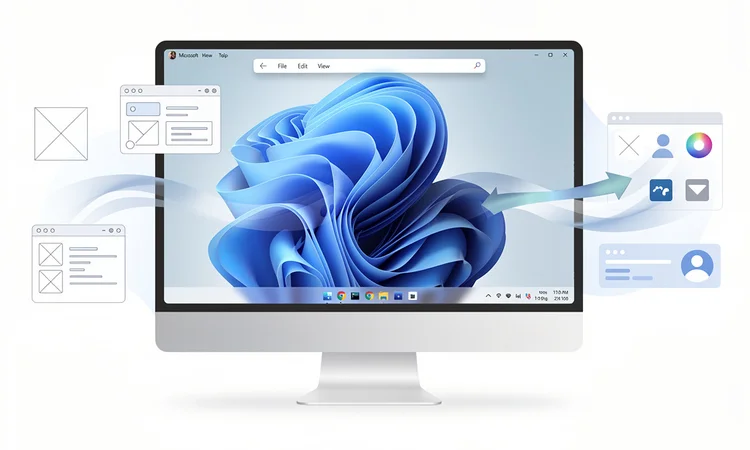
Microsoft is quietly testing a radical reimagining of the Windows 11 user interface through its PowerToys toolkit, introducing an experimental top menu bar that could fundamentally alter how users interact with their desktop environment. The feature, currently in early testing phases, represents one of the most significant interface experiments since the controversial removal of the Start button in Windows 8, and signals Microsoft’s willingness to explore alternatives to the taskbar-centric design that has defined Windows for three decades.
According to The Verge , the new PowerToy experiment places a macOS-style menu bar at the top of the screen, offering quick access to system functions, running applications, and frequently used tools. While this may seem like a simple cosmetic change, the implications for Windows users—particularly power users and enterprise customers—could be profound. The move suggests Microsoft is actively researching whether decades of muscle memory built around bottom-aligned taskbars might be worth disrupting for potential productivity gains.
The timing of this experiment is particularly noteworthy given Microsoft’s recent struggles with Windows 11 adoption rates and user satisfaction. Industry analysts have noted that Windows 11’s centered taskbar and stricter hardware requirements have created friction with longtime Windows users, many of whom have resisted upgrading from Windows 10. By testing alternative interface paradigms through PowerToys—a sandbox environment that allows Microsoft to gauge user interest without committing to wholesale changes—the company appears to be seeking data-driven answers to fundamental questions about desktop computing ergonomics.
The Strategic Role of PowerToys in Microsoft’s Development Philosophy
PowerToys has evolved from a collection of utilities into something far more significant: a testing ground for potentially transformative Windows features. Originally released for Windows 95 and revived for Windows 10 in 2019, PowerToys now serves as Microsoft’s experimental laboratory where controversial or unproven concepts can be evaluated by real users in production environments. This approach allows Microsoft to gather telemetry and feedback without the risk of alienating mainstream users who might resist dramatic changes to the core operating system.
The menu bar experiment joins a roster of PowerToys features that have demonstrated Microsoft’s interest in reconsidering fundamental Windows conventions. Tools like FancyZones, which provides advanced window management capabilities, and PowerToys Run, a Spotlight-style launcher, have already shown that significant productivity improvements can come from rethinking basic interface elements. Some PowerToys features have graduated to become official Windows components, suggesting this experimental menu bar could eventually influence future Windows releases if user reception proves positive.
Technical Implementation and User Experience Considerations
The technical architecture of the top menu bar PowerToy reveals Microsoft’s careful approach to system-level interface modifications. Rather than replacing the existing taskbar, the experimental feature adds a supplementary layer that coexists with Windows 11’s native interface elements. This design choice minimizes system conflicts and allows users to enable or disable the feature without affecting core Windows functionality—a crucial consideration for enterprise environments where stability and compatibility are paramount.
Early testing has revealed both the potential and challenges of transplanting macOS-style interface conventions to Windows. The menu bar provides consolidated access to system settings, notifications, and application menus in a way that reduces screen clutter and maximizes vertical space—particularly valuable for laptop users with limited display real estate. However, Windows applications are fundamentally designed around different interface paradigms than macOS apps, creating integration challenges that Microsoft’s engineers must address to ensure the feature feels native rather than grafted-on.
Industry Reaction and Competitive Context
The broader technology industry has taken notice of Microsoft’s willingness to experiment with such fundamental interface changes. While Apple has maintained its top menu bar design since the original Macintosh in 1984, and Linux desktop environments have long offered flexible interface configurations, Windows has remained remarkably consistent in its bottom-aligned taskbar approach. Microsoft’s exploration of alternatives suggests the company recognizes that interface conventions established in the 1990s may not be optimal for modern computing workflows and display configurations.
This experimentation occurs against a backdrop of increasing competition in desktop operating systems, not just from Apple’s macOS but from cloud-based alternatives and the growing sophistication of Linux desktop environments. Enterprise customers, in particular, are evaluating operating system choices more critically than ever, weighing factors like productivity tools, interface flexibility, and total cost of ownership. Microsoft’s willingness to test radical interface changes through PowerToys demonstrates an awareness that standing still on interface design could erode Windows’ competitive position over time.
Enterprise Implications and Deployment Considerations
For enterprise IT departments, Microsoft’s menu bar experiment raises important questions about future Windows deployments and user training strategies. Large organizations have invested heavily in Windows-based workflows, documentation, and training materials built around the traditional taskbar interface. Any significant interface changes that eventually graduate from PowerToys to mainstream Windows releases would require substantial investment in retraining and workflow adaptation.
However, the PowerToys approach also offers enterprises a valuable opportunity to evaluate potential interface changes before they become mandatory. IT departments can deploy PowerToys in controlled pilot programs, gathering feedback from representative user groups and assessing productivity impacts before committing to organization-wide changes. This graduated approach to interface evolution represents a more mature strategy than Microsoft’s historical tendency toward abrupt, universal changes that sometimes generated significant user backlash.
The Broader Evolution of Desktop Interface Design
Microsoft’s menu bar experiment reflects broader questions facing the entire desktop computing industry about optimal interface design in an era of diverse display sizes, touch inputs, and evolving work patterns. The traditional desktop metaphor—with its taskbar, system tray, and window management conventions—was designed for single-monitor, mouse-driven workflows that are increasingly anachronistic in a world of multiple displays, touch screens, and hybrid input methods.
The rise of remote work has further complicated interface design considerations, as users increasingly switch between different computing environments throughout their day—from desktop workstations to laptops to tablets. An interface paradigm that works well on a 27-inch desktop monitor may be less effective on a 13-inch laptop screen, yet users expect consistency across devices. Microsoft’s experimentation with alternative interface layouts through PowerToys suggests the company is grappling with how to serve diverse use cases without fragmenting the Windows user experience.
Historical Precedents and Lessons from Past Interface Changes
Microsoft’s cautious approach to testing the menu bar through PowerToys stands in stark contrast to previous interface experiments that were imposed on users without adequate preparation or alternatives. Windows 8’s removal of the Start button and introduction of the Metro interface generated such intense user resistance that Microsoft was forced to partially reverse course in subsequent updates. The Windows 11 centered taskbar, while less controversial, still prompted enough complaints that Microsoft eventually added options to restore left-aligned icons.
These historical lessons appear to have influenced Microsoft’s current strategy of using PowerToys as a low-stakes testing environment. By allowing users to opt into experimental features rather than forcing changes upon them, Microsoft can gather authentic usage data and feedback while maintaining goodwill with its user base. This approach acknowledges that interface preferences are deeply personal and that productivity gains from new designs must be substantial enough to justify the disruption of established workflows.
Future Directions and Unanswered Questions
The ultimate fate of the menu bar PowerToy remains uncertain, as Microsoft has not indicated whether this experiment might eventually influence official Windows releases. The company’s track record with PowerToys features is mixed—some have graduated to mainstream Windows components, while others have remained experimental utilities for power users. The menu bar’s future likely depends on adoption rates, user feedback, and Microsoft’s assessment of whether the productivity benefits justify the development investment required to fully integrate such a feature into Windows.
What is clear is that Microsoft’s willingness to experiment with fundamental interface conventions through PowerToys represents a more mature and user-centric approach to operating system development than the company has historically demonstrated. By creating structured opportunities for users to evaluate and provide feedback on potential changes before they become mandatory, Microsoft is building a more collaborative relationship with its user base. Whether the menu bar experiment specifically succeeds or fails, this approach to interface evolution may prove to be PowerToys’ most valuable contribution to Windows development—a methodology that balances innovation with respect for established workflows and user preferences.






Leave a Reply
Your email address will not be published.